
Hang Message2.6 - Google Play
You'll be able to see results in few seconds.
Publisher Description
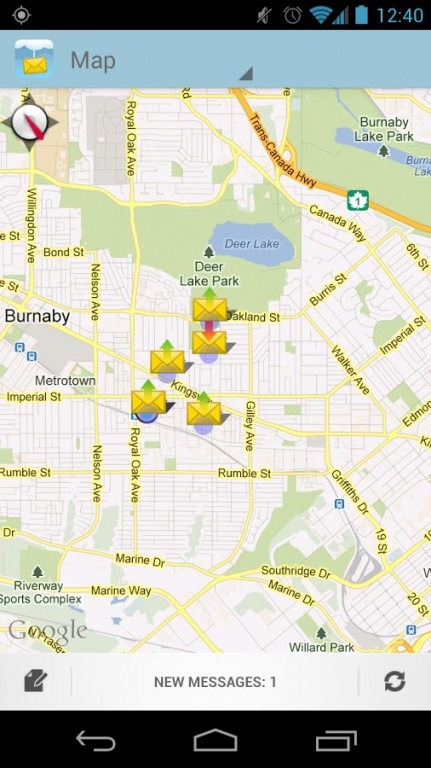
HangMessage revolutionizes texting from boring to full of fun and surprises. Pick a specific address to hang a surprise message for your friend to receive as soon as they get to that location or even post it right where you are. Send yourself a memo so once you arrive at that exact place, your phone will receive the self-reminder HangMessage and you'll never forget to buy an item from your grocery list ever again. Enjoy games? Turn messaging into an exciting adventure with your friends such as a treasure hunt by hanging multiple messages at different points in the city and see who can find all the messages first. The messages can hang for any amount of time until the recipient collects them. You can vary the radius of where the message can be received from and once read, the receiver can obtain walking directions to the message's precise location. A receipt notification will appear on your phone after your friend reads the HangMessage.
About Hang Message
The company that develops Hang Message is Earthlandia Technology Inc. The latest version released by its developer is 2.6.
To install Hang Message on your Android device, just click the green Continue To App button above to start the installation process. The app is listed on our website since 2013-09-23 and was downloaded 0 times. We have already checked if the download link is safe, however for your own protection we recommend that you scan the downloaded app with your antivirus. Your antivirus may detect the Hang Message as malware as malware if the download link to com.sysdisc.mobile.hangmessage is broken.
How to install Hang Message on your Android device:
- Click on the Continue To App button on our website. This will redirect you to Google Play.
- Once the Hang Message is shown in the Google Play listing of your Android device, you can start its download and installation. Tap on the Install button located below the search bar and to the right of the app icon.
- A pop-up window with the permissions required by Hang Message will be shown. Click on Accept to continue the process.
- Hang Message will be downloaded onto your device, displaying a progress. Once the download completes, the installation will start and you'll get a notification after the installation is finished.
Program Details
System requirements
Download information
Pricing
Version History
version 2.6
posted on 2013-09-23
- CityVibes is a new HangMessage feature that lets you express your Vibe! The new colored regions on your map represent the most common neighborhood Vibe felt by your follow HangMessage Users. To share your Vibe tap on the CityVibes icon and select a Vibe for your current neighborhood.,- UI Updates
version 2.5
posted on 2013-02-04
Several fixes and updates
Disclaimer
Official Google Play Link
We do not host Hang Message on our servers. We did not scan it for viruses, adware, spyware or other type of malware. This app is hosted by Google and passed their terms and conditions to be listed there. We recommend caution when installing it.
The Google Play link for Hang Message is provided to you by apps112.com without any warranties, representations or guarantees of any kind, so access it at your own risk.
If you have questions regarding this particular app contact the publisher directly. For questions about the functionalities of apps112.com contact us.
